Type a task the way you'd say it and NeuPlan schedules it. Plan your day on a timeline, keep habits going, focus with a Pomodoro timer and keep the monthly hisaab for milk, maid and more. Everything stays encrypted on your phone, with no account, no internet and no ads.
Works fully offline; the Android app has no internet permission
Encrypted on your phone with AES-256 (SQLCipher)
Type tasks in plain words, in 9 languages
No account, no ads, no in-app purchases
Hisaab for milk, maid, cook and other household services
iPhone and iPad · coming soonApp StoreAndroid · coming soonGoogle Play
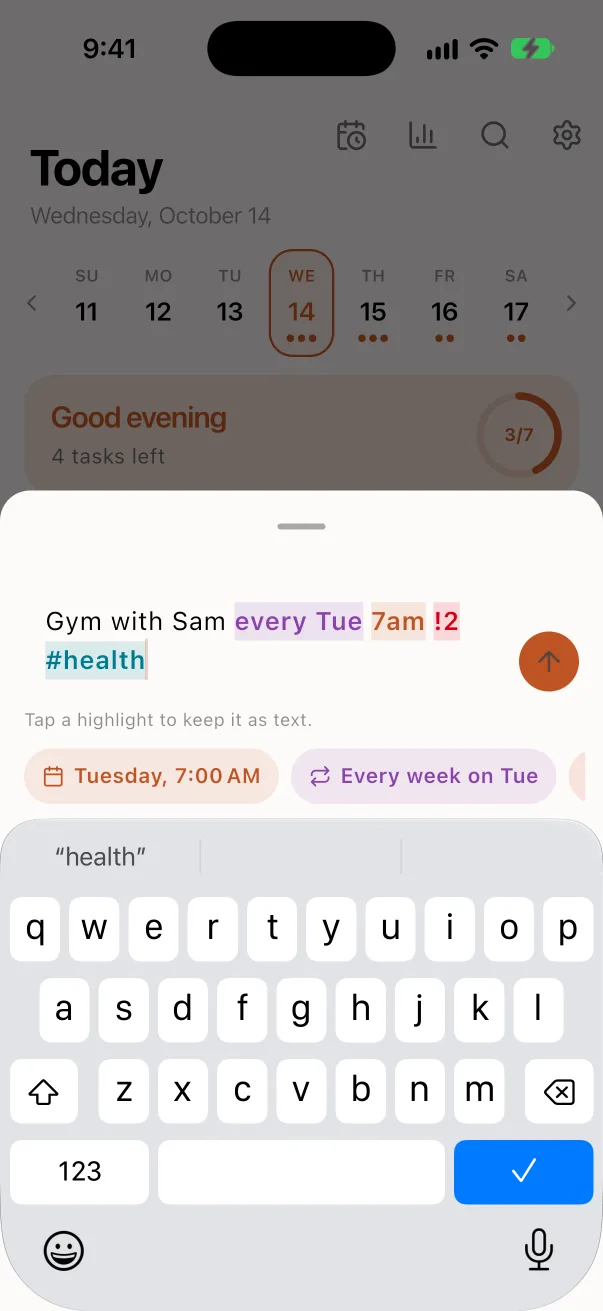
Quick add reading 'Gym with Sam every Tue 7am !2 #health', with the date, repeat, priority and tag highlighted
0
Accounts or sign-ups
9
Languages for typing tasks
5
Calendar views
256-bit
AES encryption
Inside the app
Your whole day in one calm app
What NeuPlan does, screen by screen.
Quick add
Type it the way you'd say it
Write "Gym with Sam every Tue 7am !2 #health" and NeuPlan sets the date, repeat, priority and tag.
Understands English, Hindi, Spanish, Portuguese, German, French, Indonesian, Japanese and Arabic
Type ~ to pick a list, # for a tag and ! for priority
Tap a highlight to keep that word as plain text
Add subtasks, notes, a duration and as many reminders as you like
Today
See what today needs
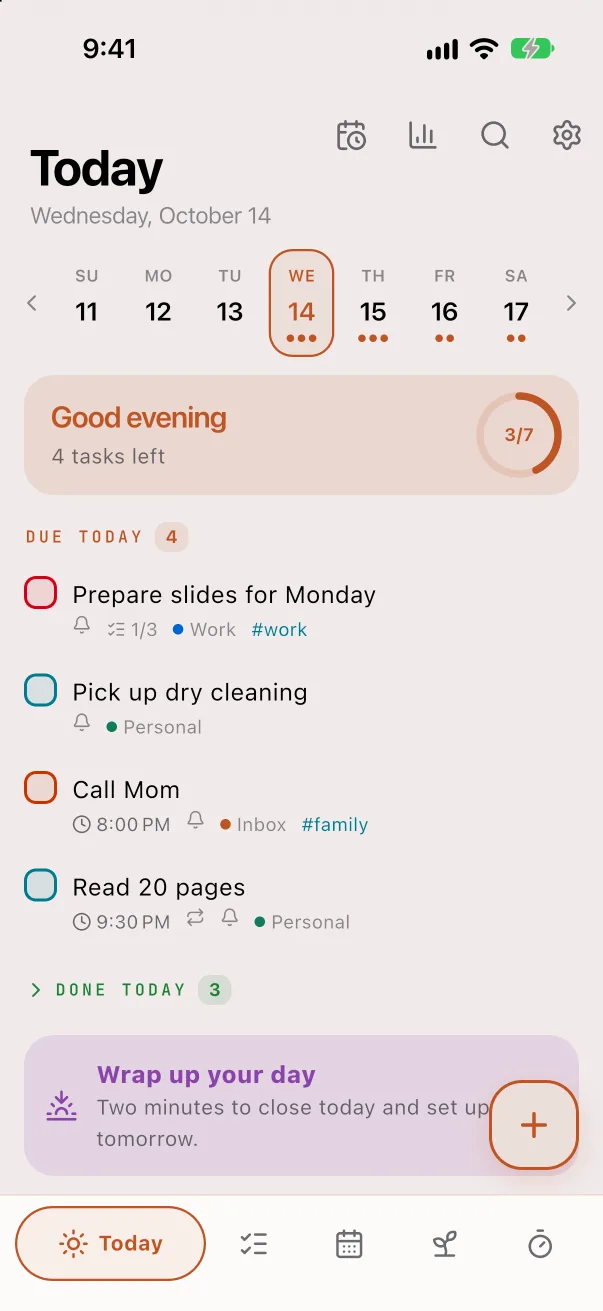
Today shows what's due, what's overdue and how much is done, with a week strip to look ahead.
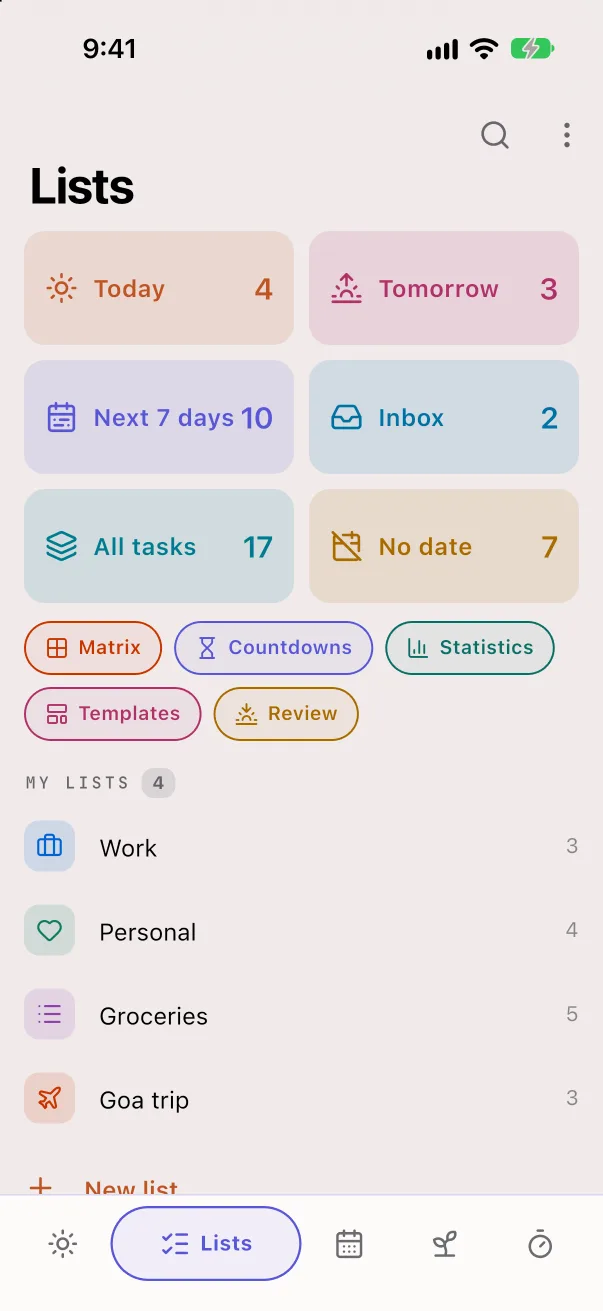
Smart lists for Today, Tomorrow, Next 7 days, No date and Someday
Your own lists, tags and saved filters, with a Kanban view
A two-minute wrap-up to close the day and set up tomorrow
A weekly review to clear what's left
Timeline
Give each task its hour
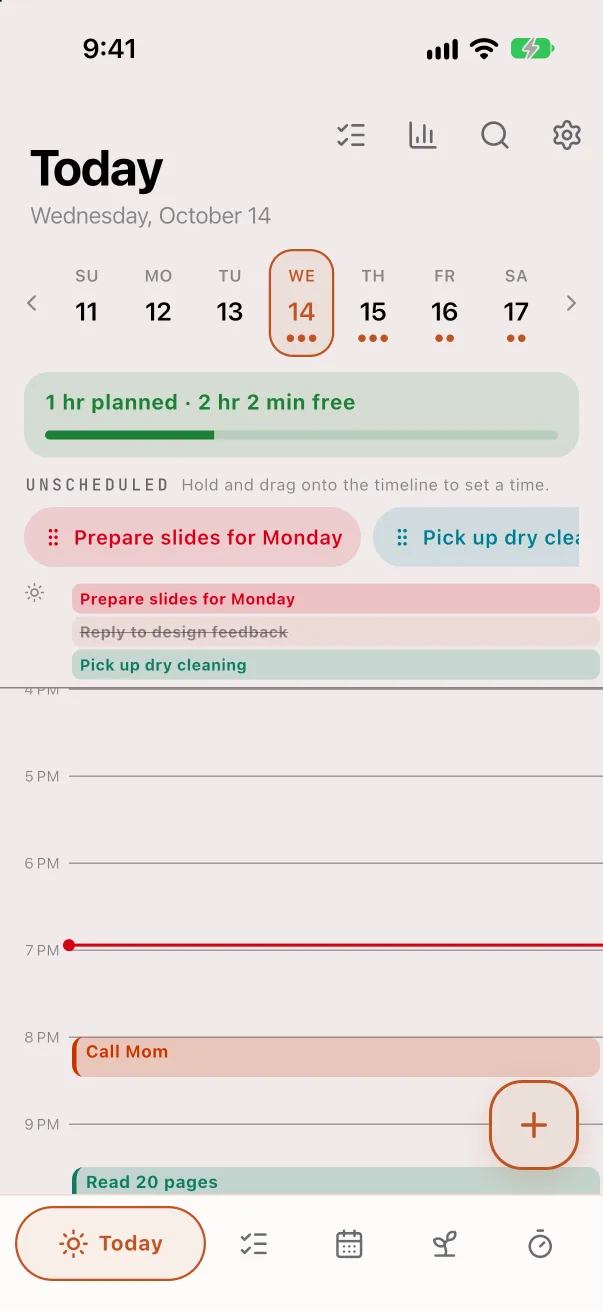
Switch Today to a timeline and drag tasks onto the hours of your day.
See how much time is planned and how much is free
Unscheduled tasks wait in a row above the timeline
Drag a task to a new time to move it
Calendar
Your tasks and your calendar together
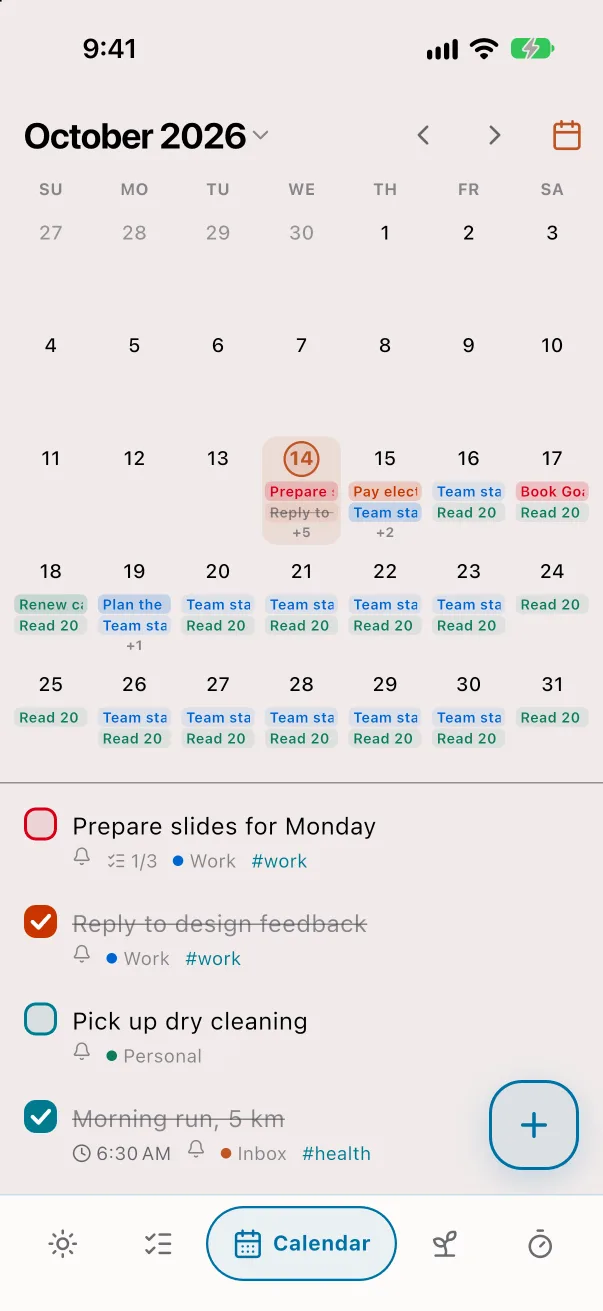
Month, week, 3-day, day and agenda views, with your phone's calendars shown beside your tasks.
Drag a task to another day or time
Your phone's calendar events are read, never changed
Tap any day to see and add its tasks
Habits
Habits that stick
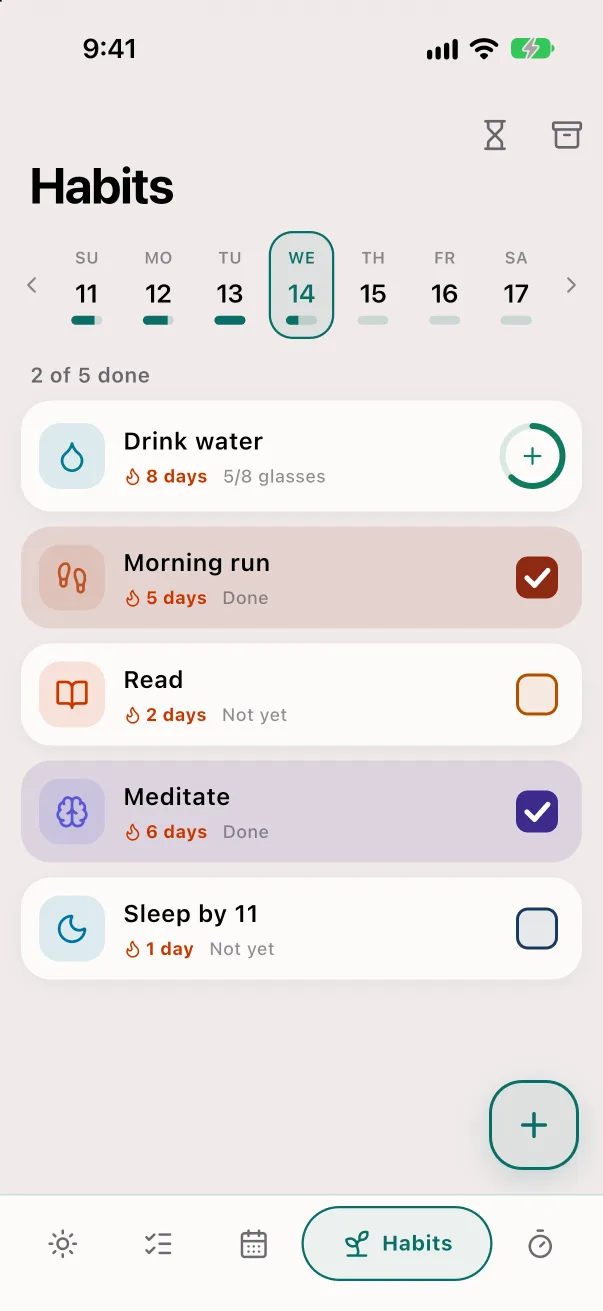
Track habits daily, on chosen days or a number of times a week, with goals like 8 glasses of water.
Streaks and a week strip that shows how each day went
Mark a day you missed and the streak catches up
Ideas to start with, from drinking water to saving money
Focus
Focus without the noise
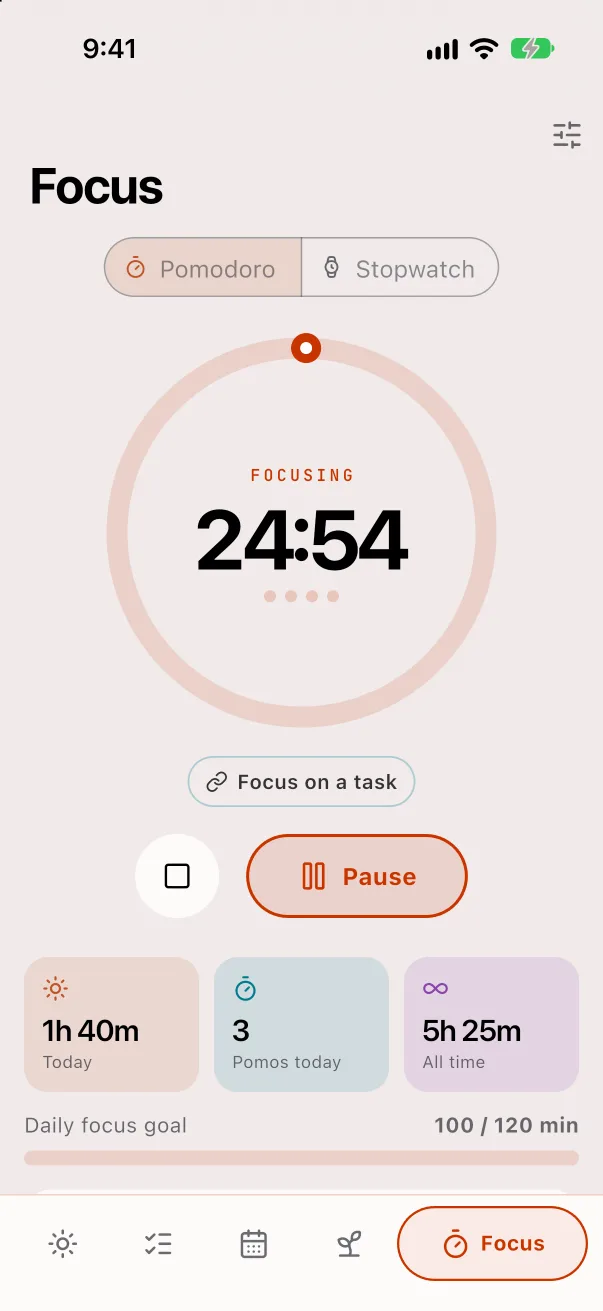
Pomodoro or stopwatch, linked to a task if you like, with a daily focus goal.
On iPhone the timer stays on the Lock Screen and Dynamic Island
On Android it stays in your notifications
Focus hours and completed tasks in Statistics
Features
Everything in NeuPlan
Every feature below is in the app today.
Hisaab for household services
Mark milk, maid, cook or newspaper each day, including morning and evening visits and half days, and get the month's bill as an image or PDF.
Reminders that repeat your way
Daily, weekdays, monthly, yearly or custom rules. Mark done or snooze for 10 minutes, an hour or until tomorrow from the notification.
Reminders at a place
On iPhone, get a reminder when you arrive at or leave a place. The phone works this out itself.
Eisenhower Matrix
Sort tasks by urgent and important, and drag them between the four boxes.
Countdowns and templates
Count down to the days that matter, and save any task or list as a template to reuse.
Widgets and shortcuts
Today's tasks on the iPhone home and lock screens and an Android widget. Add tasks with Siri on iPhone, or the Quick Settings tile and Share on Android.
Move in from other apps
Import from TickTick, Todoist or calendar (ICS) files, and export to CSV, ICS or a full backup.
Statistics
Tasks done this week, on time and overdue, focus hours, habit streaks and a trend for each list.
In your language
The app is in English, Hindi, Spanish, Portuguese, German, French, Indonesian, Japanese and Arabic, and follows your phone's language unless you pick one.
Privacy
Private by design
Everything you plan stays on your phone, encrypted, and nothing is sent to us.
What it never asks for
No account or sign-up
No ads, analytics or tracking
No NeuPlan server: your data never reaches us
No internet permission in the Android app
Your phone's calendars are read, never changed
Encrypted database
Tasks, habits and bills are kept in a database encrypted with AES-256 (SQLCipher). Its key is created on your phone and kept in the iPhone Keychain or Android Keystore.
App lock
Lock NeuPlan with Face ID, Touch ID or your fingerprint, with your phone's passcode as a backup.
Private on screen
With the lock on, Android blocks screenshots and hides the app in recent apps, and iPhone hides it in the app switcher.
Backups you own
Backup files are encrypted with AES-256-GCM and a passphrase only you know. Daily backups go to your iCloud Drive on iPhone, and into your phone's own backup on Android.
Works offline
Every feature works without internet. The app's code makes no network calls, and an automated test checks for them.
Screenshots
NeuPlan on iPhone.
Frequently asked questions
Is NeuPlan free?
NeuPlan is in testing and not in the stores yet. The app has no ads, no subscription and no in-app purchases, and every feature is open with no limits on lists, tasks or habits.
Do I need an account or internet?
No. There is no sign-up, and every feature works offline. The Android app doesn't even have the internet permission.
Where are my tasks stored?
Only on your phone, in a database encrypted with AES-256 (SQLCipher). The key stays in the iPhone Keychain or Android Keystore. There is no NeuPlan server, so we never see your data.
Can I move from TickTick or Todoist?
Yes. Import a TickTick backup or a Todoist export, or any calendar (ICS) file. You can export your tasks to CSV or ICS at any time.
Which languages can I type tasks in?
Quick add understands dates, times and repeats in English, Hindi, Spanish, Portuguese, German, French, Indonesian, Japanese and Arabic.
Does it sync between devices?
No, there is no cloud sync. To move to a new phone, restore an encrypted backup file. Daily backups go to your iCloud Drive on iPhone and into your phone's own backup on Android.
Does NeuPlan show my phone's calendar?
Yes, if you allow it. Your calendar events appear beside your tasks. NeuPlan only reads them and never changes your calendar.
What is Hisaab?
A daily log for household services such as milk, maid, cook, driver and newspaper. Mark each day, including half days and morning or evening visits, and NeuPlan works out the month's bill with paid leaves and rate changes. Share the bill as an image or PDF.
Can it remind me at a place?
On iPhone, yes: set a reminder for when you arrive at or leave a place, and the phone works it out itself. Android doesn't have place reminders.
When will NeuPlan be on the App Store and Google Play?
The iPhone and iPad app is in TestFlight testing, and the Android app is being prepared for Google Play. Both are coming soon.